When first starting with Angular, a common question I see asked is why do I get the error "The term 'ng' is not recognized as the name of a cmdlet". Tye typical reason is that you do not have the angluar cli installed. In order to install angular cli, type the following at a command prompt:
npm install -g @angular/cli
After the installation completes, you can then run angular cli commands such as ng serve, etc.,
Need a developer, architect or manager? I am available - email me at [email protected]
One of the nice new features in C# 10 is file scoped namespaces. It clears some of the cruft and provides more horizontal space for code instead of an extra indent. If you are using Visual Studio 2022 or later you have a couple of nice options to apply this change at a page or project level.
At a page level, you can simply add a semi-colon at the end of your traditional using statement:
namespace ApiKeyAuthentication
{
    ...
}
VS will auto refactor this to
namespace ApiKeyAuthentication;
and remove the curly braces and indentation.
If you want to apply this to your entire project, follow these steps:
- Create a new file in your project root called .editorconfig (or use the existing file)
- Under Code Style search for namespace and select File Scoped

- Go to one of your traditional namespace declarations, right-click it and select "Quick Actions and Refactorings". You will see a list of all refactoring actions available, and one of them will be "Convert to file-scoped namespace". At the bottom, select Project and you’ll see a preview of the changes to be made. Then click Apply.
- Build your project and ensure there are no errors.
Need a developer, architect or manager? I am available - email me at [email protected]
Recently I was getting up to speed with some of the new features and changes in Angular 15. I had previously used the Angular 13 tutorial on techiediaries which provides a good overview of Angular CLI, Angular HTTPClient, Angular components, routing, Material UI and more. While that tutorial is good, it is older and many of the instructions/examples will not work in Angular 15.
For example, the tutorial does not use Strict mode for TypeScript. Additionally, some of the npm packages referenced either have security vulnerabilities or are no longer maintained.
The npm package faker used to generate seed data for the API is not longer maintained. Instead, I used falso which is an updated and cleaner way to help generate test data.
I put together a complimentary Angular solution using Angular 15 and put the source code on GitHub - https://github.com/cliffordru/AngularClientRestApi
One item to note is that in my solution, I am using a Patient "entity" instead of Product as originally used with the techdiaries solution. Everything else is essentially the same and you can easily replace patient with product if you prefer.
Need a developer, architect or manager? I am available - email me at [email protected]
.NET 8 has introduced new empty collections that you can use to reduce your memory usage and speed up your runtime. Often, if you want to return an empty collection such as a List<T> or Dictionary<K,T> you need to new up a new instance. The downside is memory is allocated. This might not be a big deal but then again, if that code is executed thousands of times, the memory usage and processing time adds up. Just how much? Well, it is a non-trivial amount for applications looking to maximize performance.
I created a simple .NET Core console app using the .NET 8 preview along with BenchmarkDotNet to measure the difference between the old approach vs. new.
Some example code:
[Benchmark]
public IReadOnlyDictionary<int, User> Dictionary_New()
{
    return ReadOnlyDictionary<int, User>.Empty;
}

[Benchmark]
public IReadOnlyDictionary<int, User> Dictionary_Old()
{
    return new Dictionary<int, User>();
}
Here are the results:
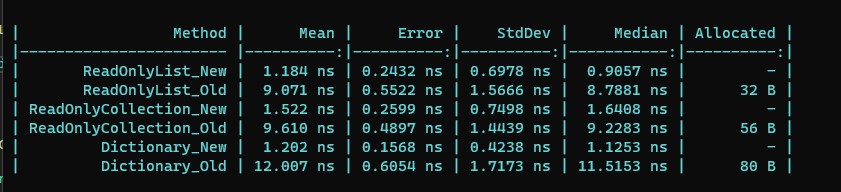
As you can see, the run time and memory usage between old and new is non-trivial and going forward, I plan to use these new empty collections.
My sample app with the full source code is available on GitHub - https://github.com/cliffordru/BenchmarkEmptyCollections
Need a developer, architect or manager? I am available - email me at [email protected]
Visual Studio 2022 v17.5 has some nice new features. Two of my favorites are support for .http files as well as the new universal search.
To use .http files, simple add a new file with a .http extention. Once you do this, you can enter URIs that you want to call. You can further enhance the file by creating variable. Here is a simple example:
@hostname = localhost
@port = 57678
@host = {{hostname}}:{{port}}

GET http://{{host}}/api/Patients
Accept: application/json
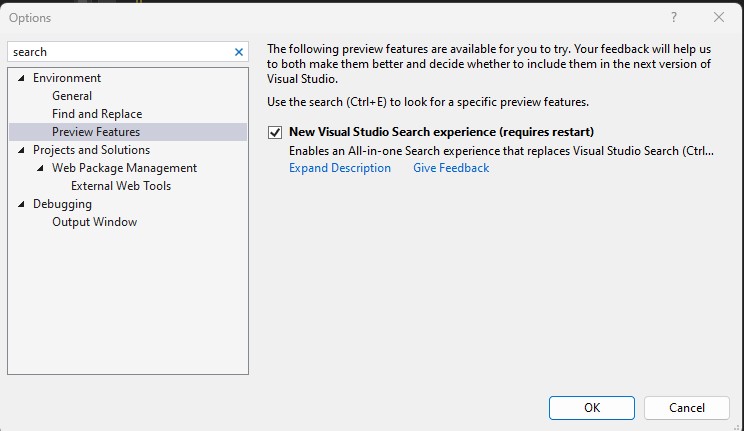
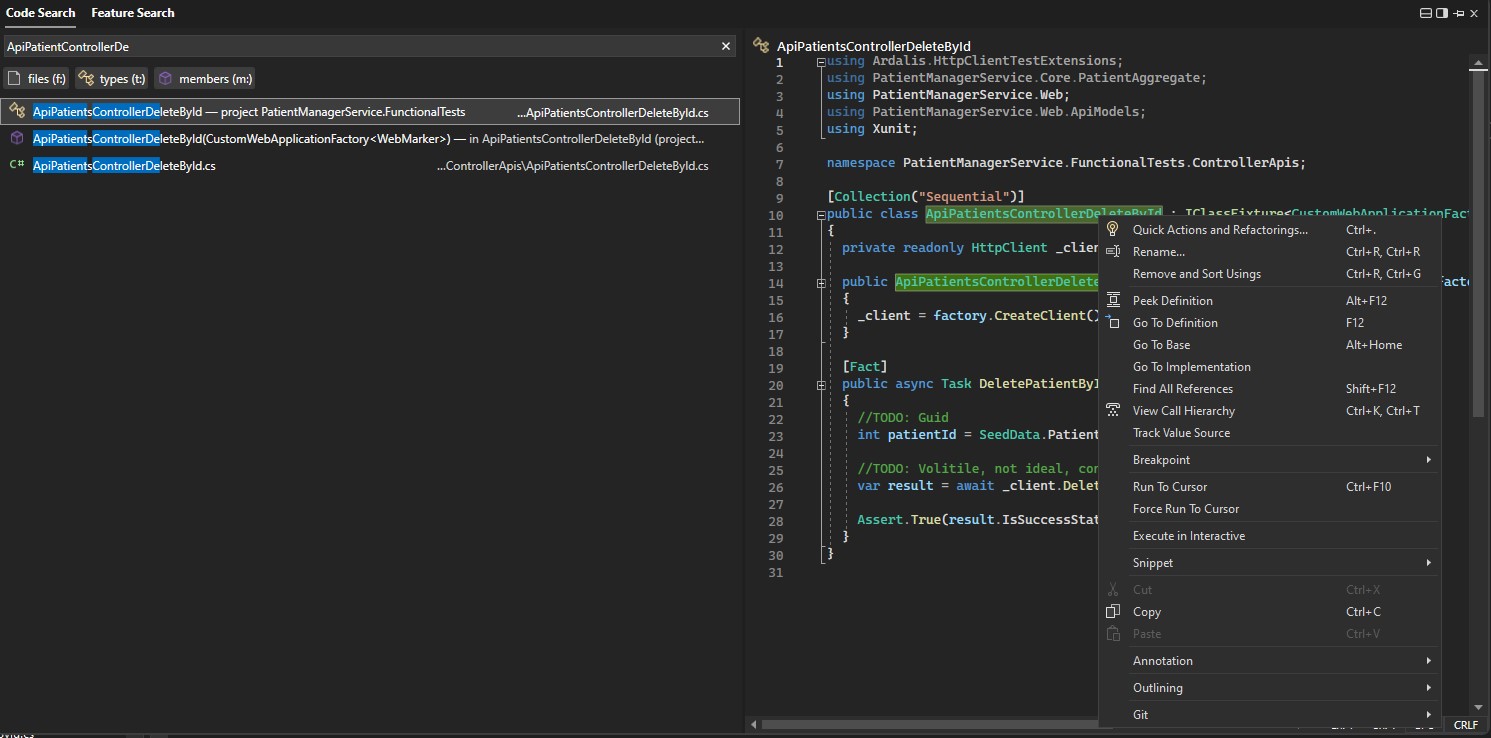
Another really nice feature is universal search. You need to enable this feature before using it. To do so, go to Tools -> Options and then type search into the Search Options field. Under Environment in the results, select Preview Features to enable it. You will need to restart visual studio for the change to take effect. The new search is nice and fast and allows you to search through code or features.
From the code search results you can find classes, methods, etc., and rename right from the search results pane
Need a developer, architect or manager? I am available - email me at [email protected]
If you need to add a custom HTTP header such as x-api-key to your API calls and want to include this while using the swagger API, you can use the code below and add it to your program.cs file in a .NET Core application to get it working.
builder.Services.AddSwaggerGen(c =>
    {
        c.AddSecurityDefinition("ApiKey", new OpenApiSecurityScheme
        {
            Description = "The API Key to access the API",
            Type = SecuritySchemeType.ApiKey,
            Name = "x-api-key",
            In = ParameterLocation.Header,
            Scheme = "ApiKeyScheme"
        });
        var scheme = new OpenApiSecurityScheme
        {
            Reference = new OpenApiReference
            {
                Type = ReferenceType.SecurityScheme,
                Id = "ApiKey"
            },
            In = ParameterLocation.Header
        };
        var requirement = new OpenApiSecurityRequirement
        {
            {scheme, new List<string>() }
        };
        c.AddSecurityRequirement(requirement);
    });
On the swagger UI, you will then see an Authorize button that when clicked, allows you to enter the header value and it will be included in your requests.
Full code sample on GitHub - https://github.com/cliffordru/ApiKeyAuthentication
Need a developer, architect or manager? I am available - email me at [email protected]
Recently I was watching Nick Chapsas on YouTube and his tutorial on Implementing API Key Authentication in ASP.NET Core. He did a very nice job of explaining how to add checking for a HTTP Header value to authenticate calls to your web api. He touched on adding support for minimal endpoints in .NET core by creating a filter. Specifically, a class ApiKeyEndpointFilter that will return TypedResults.Unauthorized if the x-api-key is missing or invalid. This return type does not support a custom unauthorized message. In order to accomplish that, a new class is needed that implements IResult and IStatusCodeHttpResult. The class signature looks like: UnauthorizedHttpObjectResult : IResult, IStatusCodeHttpResult
Once you implement, you can then use the following approach to use the filter:
return new UnauthorizedHttpObjectResult("API Key missing");

app.MapGet("/", () => "Welcome mini!")
                .AddEndpointFilter<ApiKeyEndpointFilter>();
My full solution is available on GitHub:
https://github.com/cliffordru/ApiKeyAuthentication.git
See UnauthorizedHttpObjectResult.cs for the code needed to return a custom message.
Tags: unauthorized http objectresult TypedResults with custom message
Need a developer, architect or manager? I am available - email me at [email protected]